About Integrating Oracle Autonomous AI Database with Microsoft Entra ID
Oracle Autonomous AI Database and Microsoft Entra ID can be configured to allow users and applications to connect to the database using their Entra ID credentials.
Azure users and applications can log in with Entra ID Single Sign On (SSO) credentials to access the database. This is done with an Entra ID OAuth2 access token that the user or application first requests from Entra ID. This OAuth2 access token contains the user identity and database access information and is then sent to the database. Refer to Refer to the Microsoft article Passwordless authentication options for Azure Active Directory for information about configuring multi-factor and passwordless authentication.
You can perform this integration in the following Oracle AI Database environments:
-
On-premises Oracle AI Database release 19.18 and later, excluding 21c
-
All Oracle AI Database server platforms: Linux, Windows, AIX, Solaris, and HPUX
-
Oracle Autonomous AI Database Serverless
-
Oracle Autonomous AI Database on Dedicated Exadata Infrastructure
-
Oracle Autonomous AI Database on Exadata Cloud@Customer
-
Oracle Exadata Database Service on Dedicated Infrastructure
-
Oracle Exadata Database Service on Cloud@Customer
-
Oracle Base Database Service
The instructions for configuring Entra ID use the term “Oracle AI Database” to encompass these environments.
This type of integration enables the Azure user to access an Oracle Autonomous AI Database instance. Azure users and applications can log in with Entra ID Single Sign On (SSO) credentials to get an Entra ID OAuth2 access token to send to the database.
The Entra ID administrator creates and registers Oracle Autonomous AI Database with Entra ID. Within Entra ID, this is called an app registration, which is short for application registration. This is the digital information that Entra ID must know about the software that is using Entra ID. The Entra ID administrator also creates application (app) roles for the database app registration in Entra ID. App roles connect Azure users, groups, and applications to database schemas and roles. The Entra ID administrator assigns Azure users, groups, or applications to the app roles. These app roles are mapped to a database global schema or a global role or to both a schema and a role. An Azure user, group, or application that is assigned to an app role will be mapped to a database global schema, global role, or to both a schema and a role. An Oracle global schema can also be mapped exclusively to an Azure user. An Azure guest user (non-organization user) or an Entra ID service principal (application) can only be mapped to a database global schema through an Entra ID app role. An Oracle global role can only be mapped from an Azure app role and cannot be mapped from an Azure user.
Oracle Autonomous AI Database tools including Oracle APEX, Database Actions, Oracle Graph Studio, and Oracle AI Database API for MongoDB are not compatible with using Entra ID tokens to connect with the database.
Tools and applications that are updated to support Entra ID tokens can authenticate users directly with Entra ID and pass the database access token to the Oracle Autonomous AI Database instance. You can configure existing database tools such as SQL*Plus to use an Entra ID token from a file location. In these cases, Entra ID tokens can be retrieved using tools like Microsoft PowerShell or Azure CLI and put into a file location. An Entra ID OAuth2 database access tokens are issued with an expiration time. The Oracle AI Database client driver will ensure that the token is in a valid format and that it has not expired before passing it to the database. The token is scoped for the database, which means that there is information in the token about the database where the token will be used. The app roles the Entra ID principal was assigned to in the database Entra ID app registration are included as part of the access token. The directory location for the Entra ID token should only have enough permission for the user to write the token file to the location and the database client to retrieve these files (for example, just read and write by the user). Because the token allows access to the database, it should be protected within the file system.
Azure users can request a token from Entra ID using a number of methods to open an Azure login window to enter their Entra ID credentials.
Oracle Autonomous AI Database accepts tokens representing the following Entra ID principals:
-
Azure user, who is registered user in the Entra ID tenancy
-
Guest user, who is registered as a guest user in the Entra ID tenancy
-
Service, which is the registered application connecting to the database as itself with the client credential flow (connection pool use case)
Oracle Autonomous AI Database supports the following Entra ID authentication flows:
-
Interactive flow (also called authorization code flow) using Proof Key for Code Exchange (PKCE), most commonly used for human users (not applications) to authenticate to Entra ID in a client environment with a browser
-
Client credentials, which are for database applications that connect as themselves (and not the end-user)
-
On-Behalf-Of (OBO), where an application requests an access token on behalf of a logged-in user to send to the database
-
Resource owner password credential (ROPC), which is not recommended for production use, but can be used in test environments where a pop-up browser user authentication would be difficult to incorporate. ROPC needs the Entra ID user name and password credential to be part of the token request call.
Note: The DBaaS integration with Microsoft Entra ID does not support users with administrative privileges (
SYSDBA,SYSOPER,SYSBACKUP,SYSDG,SYSKM, andSYSRAC).
Architecture of Oracle AI Database Integration with Microsoft Entra ID
Microsoft Azure Active Directory access tokens follow the OAuth 2.0 standard with extensions.
The Entra ID access token will be needed before you access the database from the database client (for example, with SQLPlus or SQLcl). The Oracle clients (for example, OCI, JDBC, and ODP) can be configured to pick up an Entra ID token from a file location or the token can be passed to the client through the database client API. An Azure user can use a script (examples available from Microsoft) to retrieve a token and put it into a file location for the database client to retrieve. Applications can use the Azure SDK to get an access token and pass the token through the database client API. Command-line tools such as Microsoft PowerShell or the Azure command-line interface can be used to retrieve the Entra ID token if the application cannot directly get the token.
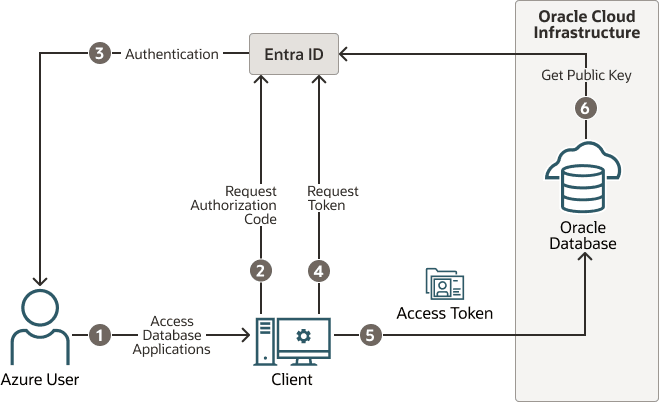
The following diagram is a generalized flow diagram for OAuth 2.0 standard, using the OAuth2 token. See Authentication flow support in MSAL in the Microsoft Entra ID documentation for more details about each supported flow.
Description of the illustration azure-authentication.png
The authorization code flow is an OAuth2 standard and is described in detail as part of the standards. There are two steps in the flow. The first step authenticates the user and retrieves the authorization code. The second step uses the authorization code to get the database access token.
-
The Azure user requests access to the resource, the Oracle AI Database instance.
-
The database client or application requests an authorization code from Entra ID.
-
Entra ID authenticates the Azure user and returns the authorization code.
-
The helper tool or application uses the authorization code with Entra ID to exchange it for the
OAuth2token. -
The database client sends the
OAuth2access token to the Oracle AI Database. The token includes the database app roles the user was assigned to in the Entra ID app registration for the database. -
The Oracle AI Database instance uses the Entra ID public key to verify that the access token was created by Entra ID.
Both the database client and the database server must be registered with the app registrations feature in the Azure Active Directory section of the Azure portal. The database client must be registered with Entra ID app registration. Permission must also be granted to allow the database client to get an access token for the database.
Azure Users Mapping to an Oracle AI Database Schema and Roles
Microsoft Azure users must be mapped to an Oracle AI Database schema and have the necessary privileges (through roles) before being able to authenticate to the Oracle AI Database instance.
In Microsoft Azure, an Entra ID administrator can assign users, groups, and applications to the database app roles.
Exclusively mapping an Entra ID user to a database schema requires the database administrator to create and manage a database schema for the lifecycle of the user (joining, moving, leaving). The database administrator must create the schema when the user joins the organization. The database administrator must also modify the privileges and roles that are granted to the database schema to align them with the tasks the Azure user is assigned to. When the Azure user leaves the organization, the database administrator must drop the database schema so that an unused account is not left on the database. Using the database app roles enables the Entra ID administrator to control access and roles by assigning users to app roles that are mapped to global schemas and global roles. This way, user access to the database is managed by Entra ID administrators and database administrators do not need to create, manage, and drop schemas for every user.
An Azure user can be mapped to a database schema (user) either exclusively or through an app role.
-
Creating an exclusive mapping between an Azure user and an Oracle AI Database schema. In this type of mapping, the database schema must be created for the Azure user. Database privileges and roles that are needed by the Azure user must be granted to the database schema. The database schema not only must be created when the Azure user is authorized to the database, but the granted privileges and roles must be modified as the Entra ID roles and tasks change. Finally, the database schema must be dropped when the Azure user leaves the organization.
-
Creating a shared mapping between an Entra ID app role and an Oracle AI Database schema. This type of mapping, which is more common than exclusive mappings, is for Azure users who have been assigned directly to the app role or is a member of an Entra ID group that is assigned to the app role. The app role is mapped to an Oracle AI Database schema (shared schema mapping). Shared schema mapping allows multiple Azure users to share the same Oracle AI Database schema so a new database schema is not required to be created every time a new user joins the organization. This operational efficiency allows database administrators to focus on database application maintenance, performance, and tuning tasks instead of configuring new users, updating privileges and roles, and removing accounts.
In addition to database roles and privileges being granted directly to the mapped global schema, additional roles and privileges can be granted through mapped global roles. Different Azure users mapped to the same shared global schema may need different privileges and roles. Azure app roles can be mapped to Oracle AI Database global roles. Azure users who are assigned to the app role or are a member of an Entra ID group that is assigned to the app role will be granted the Oracle AI Database global role when they access the database.
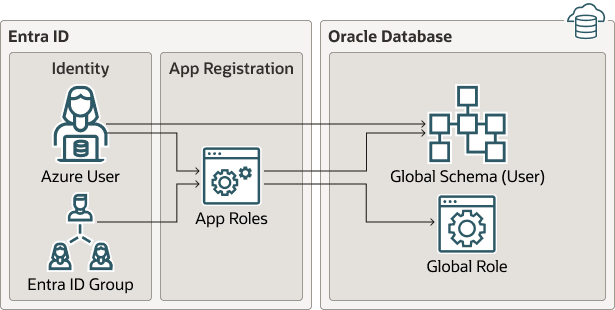
The following diagram illustrates the different types of assignments and mappings that are available.
Description of the illustration azure_mappings.png
These mappings are as follows:
-
An Azure user can be mapped directly to an Oracle AI Database global schema (user).
-
An Azure user, Entra ID group, or application is assigned to an app role, which is then mapped to either an Oracle AI Database global schema (user) or a global role.
Use Cases for Connecting to an Oracle AI Database Using Entra ID
Oracle AI Database supports several use cases for connecting to the database.
-
OAuth2 authorization code flow: This is the most common flow for human users. The client directs the Azure user to Entra ID to get the authorization code. This code is used to get the database access token. See the Microsoft Azure article Microsoft identity platform and OAuth 2.0 authorization code flow.
-
Resource owner password credentials (ROPC): This flow is not recommended for production servers. It is useful for test software that cannot work with a pop-up authentication window. It is used in non-graphic user interface environments when a pop-up window cannot be used to authenticate a user.
-
Client credentials: This flow is used for applications to connect with the database. The application must register with Entra ID app registration and needs a client ID and client password. These client credentials must be used to get the database access token from Entra ID when the application connects to the database. The application can pass the token through the file system or through the database client API.
-
On-behalf-of (OBO) token: An Azure application requests an OBO token for a logged in user. The OBO token will also be an access token for the database with the Azure user identity and assigned app roles for the database. This enables the Azure user to log in to the database as the user and not the application. Only an application can request an OBO token for its Azure user and pass it to the database client through the API.