Move an Autonomous AI Database to a Different Compartment
Shows you the steps to move a database to a different Oracle Cloud Infrastructure compartment.
-
To move a database you must have the right to manage Autonomous AI Databases in the database's current compartment and in the compartment you are moving it to.
-
As soon as you move a database to a different compartment, the policies that govern the new compartment apply immediately and affect access to the database. Therefore, your access to the database may change, depending on the policies governing your Oracle Cloud user account's access to resources.
Perform the following prerequisite steps as necessary:
-
Open the Oracle Cloud Infrastructure Console by clicking the
 next to Cloud.
 -
From the Oracle Cloud Infrastructure left navigation menu click Oracle AI Database and then click Autonomous AI Database.
To move a database to a different compartment:
-
Choose your region. See Switching Regions for information on switching regions and working in multiple regions.
-
Choose your Compartment. See Compartments for information on using and managing compartments.
-
Select an Autonomous AI Database instance from the list in your compartment.
-
On the Details page, from the More actions drop-down list, select Move resource.
-
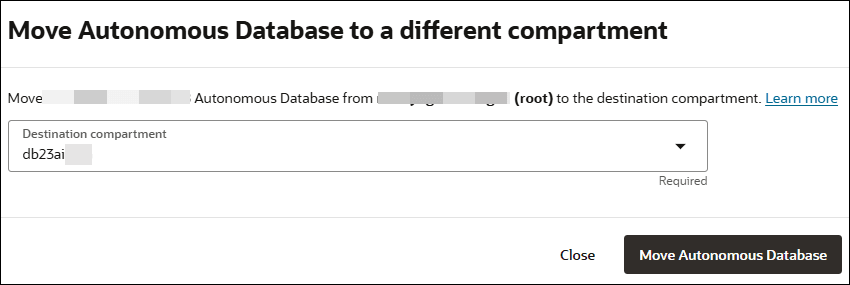
In the Move Autonomous AI Database to a different compartment page, select the new compartment.
-
Click Move Autonomous AI Database.
See Moving Database Resources to a Different Compartment for more information.