About Data Pipelines on Autonomous AI Database
Autonomous AI Database data pipelines are either load pipelines or export pipelines.
Load pipelines provide continuous incremental data loading from external sources (as data arrives on object store it is loaded to a database table). Export pipelines provide continuous incremental data exporting to object store (as new data appears in a database table it is exported to object store). Pipelines use database scheduler to continuously load or export incremental data.
Autonomous AI Database data pipelines provide the following:
-
Unified Operations: Pipelines allow you to quickly and easily load or export data and repeat these operations at regular intervals for new data. The
DBMS_CLOUD_PIPELINEpackage provides a unified set of PL/SQL procedures for pipeline configuration and for creating and starting a scheduled job for load or export operations. -
Scheduled Data Processing: Pipelines monitor their data source and periodically load or export the data as new data arrives.
-
High Performance: Pipelines scale data transfer operations with the available resources on your Autonomous AI Database. Pipelines by default use parallelism for all load or export operations, and scale based on the CPU resources available on your Autonomous AI Database, or based on a configurable priority attribute.
-
Atomicity and Recovery: Pipelines guarantee atomicity such that files in object store are loaded exactly once for a load pipeline.
-
Monitoring and Troubleshooting: Pipelines provide detailed log and status tables that allow you to monitor and debug pipeline operations.
-
Multicloud Compatible: Pipelines on Autonomous AI Database support easy switching between cloud providers without application changes. Pipelines support all the credential and object store URI formats that Autonomous AI Database supports (Oracle Cloud Infrastructure Object Storage, Amazon S3, Azure Blob Storage or Azure Data Lake Storage, Google Cloud Storage, and Amazon S3-Compatible object stores).
About the Data Pipeline Lifecycle on Autonomous AI Database
The DBMS_CLOUD_PIPELINE package provides procedures for creating, configuring, testing, and starting a pipeline. The pipeline lifecycle and procedures are the same for both load and export pipelines.
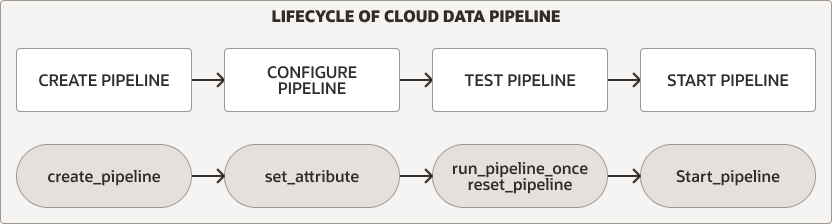
Description of the illustration pipeline_lifecycle.png
For either pipeline type you perform the following steps to create and use a pipeline:
-
Create and configure the pipeline. See Create and Configure Pipelines for more information.
-
Test a new pipeline. See Test Pipelines for more information.
-
Start a pipeline. See Start a Pipeline for more information.
In addition, you can monitor, stop, or drop pipelines:
-
While a pipeline is running, either during testing or during regular use after you start the pipeline, you can monitor the pipeline. See Monitor and Troubleshoot Pipelines for more information.
-
You can stop a pipeline and later start it again, or drop a pipeline when you are finished using the pipeline. See Stop a Pipeline and Drop a Pipeline for more information.
About Load Pipelines on Autonomous AI Database
Use a load pipeline for continuous incremental data loading from external files in object store into a database table. A load pipeline periodically identifies new files in object store and loads the new data into the database table.
A load pipeline operates as follows (some of these features are configurable using pipeline attributes):
-
Object store files are loaded in parallel into a database table.
-
A load Pipeline uses the object store file name to uniquely identify and load newer files.
-
Once a file in object store has been loaded in the database table, if the file content changes in object store, it will not be loaded again.
-
If the object store file is deleted, it does not impact the data in the database table.
-
-
If failures are encountered, a load pipeline automatically retries the operation. Retries are attempted on every subsequent run of the pipeline's scheduled job.
-
In cases where the data in a file does not comply with the database table, it is marked as
FAILEDand can be reviewed to debug and troubleshoot the issue.- If any file fails to load, the pipeline does not stop and continues to load the other files.
-
Load pipelines support multiple input file formats, including: JSON, CSV, XML, Avro, ORC, and Parquet.
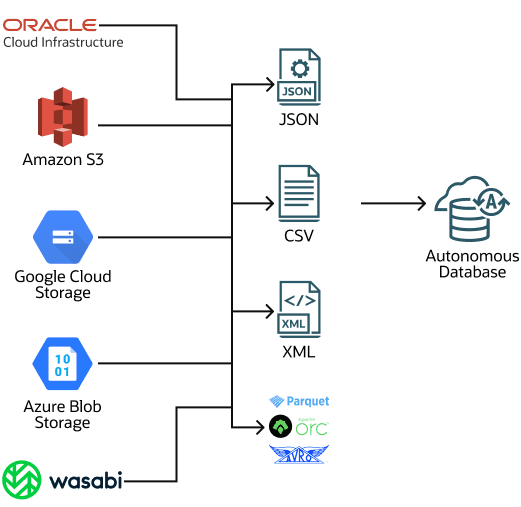
Migration from non-Oracle databases is one possible use case for a load pipeline. When you need to migrate your data from a non-Oracle database to Oracle Autonomous AI Database, you can extract the data and load it into Autonomous AI Database (Oracle Data Pump format cannot be used for migrations from non-Oracle databases). By using a generic file format such as CSV to export data from a non-Oracle database, you can save your data to files and upload the files to object store. Next, create a pipeline to load the data to Autonomous AI Database. Using a load pipeline to load a large set of CSV files provides important benefits such as fault tolerance, and resume and retry operations. For a migration with a large data set you can create multiple pipelines, one per table for the non-Oracle database files, to load data into Autonomous AI Database.
About Export Pipelines on Autonomous AI Database
Use an export pipeline for continuous incremental export of data from the database to object store. An export pipeline periodically identifies candidate data and uploads the data to object store.
There are three export pipeline options (the export options are configurable using pipeline attributes):
-
Export incremental results of a query to object store using a date or timestamp column as key for tracking newer data.
-
Export incremental data of a table to object store using a date or timestamp column as key for tracking newer data.
-
Export data of a table to object store using a query to select data without a reference to a date or timestamp column (so that the pipeline exports all the data that the query selects for each scheduler run).
Export pipelines have the following features (some of these are configurable using pipeline attributes):
-
Results are exported in parallel to object store.
-
In case of any failures, a subsequent pipeline job repeats the export operation.
-
Export pipelines support multiple export file formats, including: CSV, JSON, Parquet, or XML.
About Oracle Maintained Pipelines
Autonomous AI Database provides built-in pipelines for exporting logs to object store. These pipelines are preconfigured and can be started by the ADMIN user.
The Oracle Maintained pipelines are:
-
ORA$AUDIT_EXPORT: This pipeline exports the database audit logs to object store in JSON format and runs every 15 minutes after starting the pipeline (based on theintervalattribute value). -
ORA$APEX_ACTIVITY_EXPORT: This pipeline exports the Oracle APEX workspace activity log to object store in JSON format. This pipeline is preconfigured with the SQL query for retrieving APEX activity records and runs every 15 minutes after starting the pipeline (based on theintervalattribute value).
The Oracle Maintained pipelines are owned by the ADMIN user and attributes of Oracle Maintained Pipelines can be modified by the ADMIN user.
By default the Oracle Maintained Pipelines use OCI$RESOURCE_PRINCIPAL as the credential_name.
See Use Oracle Maintained Pipelines for more information.