Offload Queries to Member Refreshable Clones
When you have heavy read workloads, where a relatively small amount of data is scanned by multiple queries, you can offload queries (reads) either from an elastic pool leader or from an elastic pool member to Refreshable Clones.
About Query Offloading
Provides information about using query offload with an elastic pool and describes the query offload features.
Elastic pool query offload provides performance benefits by allowing one or more Refreshable Clones to handle queries for either an elastic pool leader or for an elastic pool member. This feature also allows you to add Refreshable Clones to accommodate increasing query (read) demand. Offloading queries allows your application to scale horizontally, where you can add Refreshable Clones to maintain overall system performance as needed to satisfy your query request volume.
When query offload is enabled, queries are submitted either to the elastic pool leader or to an elastic pool member and one or more available Refreshable Clones become candidates for query offloading. In addition, when more Refreshable Clones are added, query offload dynamically adjusts to make use of the new resources.
One use case for query offload is to enable the feature during peak hours to take load off of either the elastic pool leader or an elastic pool member. During quiet hours, you can disable query offload to perform maintenance operations such as refreshing the Refreshable Clones.
By default query offload considers queries from any session. Alternatively you can offload queries from a list of sessions that you specify by module or action name.
The following figure shows offloading queries from the elastic pool leader.
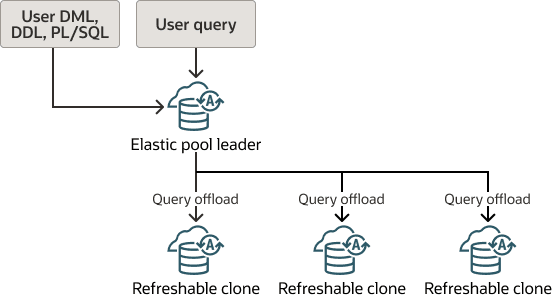
Description of the illustration autonomous-elastic-pool-leader-query-offload.png
The following figure shows offloading queries from an elastic pool member.
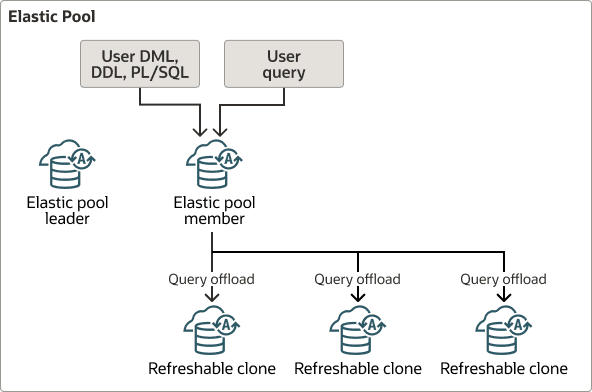
Description of the illustration autonomous-elastic-pool-member-query-offload.png
Data on the Refreshable Clones is up to date based on the last refresh time for each refreshable clone. This means when query offload is enabled you perform all DDL, DML and PL/SQL operations either on the elastic pool leader or on the elastic pool member that is offloading queries. Then, after a Refreshable Clone is refreshed, the changes are reflected on the Refreshable Clone.
See Use Refreshable Clones with Autonomous AI Database for more information.
Query Offload Features
-
Dynamic Addition: Refreshable Clones may be added as members of the elastic pool at any time. Query offload dynamically adjusts to make use of new members.
-
Dynamic Removal: Refreshable Clones may be removed as members of the elastic pool at any time. Query offload dynamically adjusts to stop offloading queries to a Refreshable Clone that has been removed from the elastic pool.
-
Session Based Sticky Offload: Query offload is sticky within a session, meaning if a query in a session has been offloaded to a particular Refreshable Clone, then query offload uses the same Refreshable Clone to offload subsequent queries in the same session.
-
One-to-One Service Mapping: There is a one-to-one mapping between the service used in either in the elastic pool leader or the elastic pool member by the original query and the service used in a Refreshable Clone for any offloaded query. For example, if a session is connected to the MEDIUM service, then query offload for that session also uses the MEDIUM service on the Refreshable Clone.
-
Determine if Session is Offloaded: Using a
SYS_CONTEXTquery you can determine if a session runs on the elastic pool leader or member, or is offloaded to a Refreshable Clone. -
Query Offload from PL/SQL: Queries are offloaded to a Refreshable Clone even if they are embedded within PL/SQL. The PL/SQL can be stored procedures, functions, packages, or anonymous blocks.
-
Query Offload from Scheduler Job: Queries from within an Oracle Scheduler job actions are offloaded. Oracle Scheduler job queries are offloaded whether the job runs in the foreground or in the background.
DBA_PROXY_SQL Views
Use the DBA_PROXY_SQL views DBA_PROXY_SQL_ACTIONS andDBA_PROXY_SQL_MODULES to display the list of modules or actions that are configured for query offload. You must query these views from a session that is not enabled for query offload.
Enable Query Offload
Describes how to enable query offload for an elastic pool leader or for an elastic pool member.
The following are requirements for enabling query offload:
-
You can enable query offload for an elastic pool leader or for an elastic pool member with no Refreshable Clones. After you enable query offloading you can add Refreshable Clones and the query offload feature dynamically adjusts to make use of the refreshable clones.
-
A Refreshable Clone that is a candidate for query offload must:
-
Have the elastic pool leader as its source database and be in the same region as the elastic pool leader.
or
Have an elastic pool member as its source database and be in the same region as the elastic pool member.
-
Be an elastic pool member.
-
To enable query offload:
-
Verify that the Autonomous AI Database instance is an elastic pool leader or an elastic pool member:
-
Use the following query to verify that an instance is an elastic pool leader:
SELECT sys_context('userenv', 'is_elastic_pool_leader') FROM DUAL;This query should return
YES. -
Use the following query to verify that an instance is an elastic pool member:
SELECT sys_context('userenv', 'is_elastic_pool_member') FROM DUAL;This query should return
YES.
Note: There may be a delay of up to 15 minutes for the
sys_contextvalue to reflect the current value if the elastic pool has recently been created or modified. -
-
Enable query offload.
There are two choices: you can enable query offload for queries from any session or limit query offload to the sessions you specify by module or action name.
-
To enable query offload for all sessions run
DBMS_PROXY_SQL.ENABLE_READ_ONLY_OFFLOADwithout parameters. For example:EXEC DBMS_PROXY_SQL.ENABLE_READ_ONLY_OFFLOAD; -
To enable query offload for specific sessions by module name or action name, run
DBMS_PROXY_SQL.ENABLE_READ_ONLY_OFFLOADwith themodule_nameoraction_nameparameters.See Enable Query Offload for Named Modules or Actions for more information.
-
When query offload is enabled for a session you can find the name of the Refreshable Clone to which queries are offloaded. For example, from the session run this query:
SELECT sys_context('userenv', 'con_name') FROM DUAL;If queries are not being offloaded to a Refreshable Clone this query shows the name of the elastic pool leader (or of the elastic pool member that is not a refreshable clone).
See SYS_CONTEXT for more information.
See ENABLE_READ_ONLY_OFFLOAD Procedure for more information.
Enable Query Offload for Named Modules or Actions
Describes how to enable query offload for sessions with named modules or actions.
To enable query offload for specific sessions by module name or action name:
-
Verify that the instance is an elastic pool leader or an elastic pool member.
- Use the following query to verify that an instance is an elastic pool leader:
SELECT sys_context('userenv', 'is_elastic_pool_leader') FROM DUAL;This query should return
YES. -
Use the following query to verify that an instance is an elastic pool member:
SELECT sys_context('userenv', 'is_elastic_pool_member') FROM DUAL;This query should return
YES.
Note: There may be a delay of up to 15 minutes for the
sys_contextvalue to reflect the current value if the elastic pool has recently been created or modified. - Use the following query to verify that an instance is an elastic pool leader:
-
Use the routines
SET_ACTIONorSET_MODULEinDBMS_APPLICATION_INFOto set the module name and or the action name in the current session.For example
CREATE or replace PROCEDURE add_employee(
  name VARCHAR2,
  salary NUMBER,
  manager NUMBER,
  title VARCHAR2,
  commission NUMBER,
  department NUMBER) AS
BEGIN
  DBMS_APPLICATION_INFO.SET_MODULE(
    module_name => 'add_employee',
    action_name => 'insert into emp');
  INSERT INTO emp
    (ename, empno, sal, mgr, job, hiredate, comm, deptno)
    VALUES (name, emp_seq.nextval, salary, manager, title, SYSDATE,
            commission, department);
  DBMS_APPLICATION_INFO.SET_MODULE(null,null);
END;
See DBMS_APPLICATION_INFO for more information.
-
Enable query offload and specify the eligible sessions by module name or by action name (or by both module name and action name).
For example:
DECLARE
   mod_values clob := to_clob('["mod1", "mod2"]');
   act_values clob := to_clob('["act1", "act2"]');
BEGIN
   DBMS_PROXY_SQL.ENABLE_READ_ONLY_OFFLOAD(
      module_name => mod_values,
      action_name => act_values);
END;
/
When query offload is enabled for a session, from the session you can find the name of the Refreshable Clone to which queries are offloaded. For example:
SELECT sys_context('userenv', 'con_name') FROM DUAL;If queries are not being offloaded to a Refreshable Clone this query shows the name of the elastic pool leader (or of the elastic pool member that is not a refreshable clone).
See SYS_CONTEXT for more information.
The views DBA_PROXY_SQL_ACTIONS and DBA_PROXY_SQL_MODULES display the list of modules or actions that are configured for query offload. You must query these views from a session that is not enabled for query offload. See DBA_PROXY_SQL Views for more information.
See ENABLE_READ_ONLY_OFFLOAD Procedure for more information.
Disable Query Offload
Describes how to disable query offload for an elastic pool leader or for an elastic pool member.
On the instance that is offloading queries, disable query offload.
For example:
EXEC DBMS_PROXY_SQL.DISABLE_READ_ONLY_OFFLOAD;See DISABLE_READ_ONLY_OFFLOAD Procedure for more information.
Query Offload from PL/SQL
When query offload is enabled, queries are offloaded to Refreshable Clones even if they are embedded within PL/SQL. The PL/SQL can be stored procedures, functions, packages, or anonymous blocks.
For example, you can demonstrate a query being offloaded to a Refreshable Clone when you enable query offload for a specific module and action. In this example, assume that the leader’s data has been updated and the Refreshable Clone has not yet been updated (so the Refreshable Clone’s data is out of date and different). In this example, with different values on the elastic pool leader and the Refreshable Clone, you can see when data is coming from either the leader or from the Refreshable Clone.
-
Enable query offload and specify the eligible sessions by module name and action name. For example, '
mod1', 'act1'.DECLARE mod_values clob := to_clob('["mod1"]'); act_values clob := to_clob('["act1"]'); BEGIN DBMS_PROXY_SQL.ENABLE_READ_ONLY_OFFLOAD( module_name => mod_values, action_name => act_values); END; / -
Define the function
f1to test query offload.SQL> create or replace function f1 (n number) return number as l_cnt number; begin select sum(c1) into l_cnt from u2.tab1; return l_cnt; end; / Function created. -
Run the function
f1. The query with functionf1runs on the elastic pool leader (or on an elastic pool member that has offload query enabled). This session runs with unspecified module and action names that do not match those specified for query offload in Step 1.SQL> -- expected to fetch from Elastic Pool Leader and returns value 40 SQL> select f1(3) from dual; F1(3) ---------- 40 1 row selected. -
Specify the module name and action name for the session to match the names specified in Step 1. The queries from this session are now eligible to be offloaded to a Refreshable Clone.
SQL> exec dbms_application_info.set_module('mod1', 'act1'); PL/SQL procedure successfully completed. -
Run the function
f1again. In this case the module name and action name match the names specified in Step 1. The query in functionf1is offloaded to a Refreshable Clone.SQL> -- Expected to fetch from Refreshable Clone and returns value 10 SQL> select f1(3) from dual; F1(3) ---------- 10 1 row selected. -
Specify the module and action names as something other than
mod1andact1. The queries from this session are no longer eligible to be offloaded to a Refreshable Clone, due to the module and action names not matching those specified in Step 1.SQL> exec dbms_application_info.set_module('random', 'random'); PL/SQL procedure successfully completed. -
Run the query with function
f1. Because the module and action name for this session do not match those set in Step 1, this query is not offloaded and runs on the elastic pool leader.SQL> -- expected to fetch from Elastic Pool Leader and returns value 40 SQL> select f1(3) from dual; F1(3) ---------- 40 1 row selected.
Query Offload from a Scheduler Job
When query offload is enabled, queries from within an Oracle Scheduler job action are offloaded to Refreshable Clones. The queries are offloaded whether the job runs in the foreground or in the background.
For example, similar to the previous example for PL/SQL, you can demonstrate a query being offloaded to a Refreshable Clone when you enable query offload for an Oracle Scheduler job. In this example, assume that the leader’s data has been updated and the Refreshable Clone has not yet been updated (so the Refreshable Clone’s data is out of date and different). In this example, with different values on the elastic pool leader and the Refreshable Clone, you can see when data is coming from either the leader or from the Refreshable Clone.
SQL> create or replace procedure sproc1 (n number)
    as
    l_cnt number;
    begin
      select sum(c1) into l_cnt from u2.tab1;
      dbms_output.put_line('l_cnt is ' || l_cnt);
    end;
    /

Procedure created.

Offload Queries from Elastic Pool Leader to Member Refreshable Clones

SQL> create or replace procedure sproc1 (n number)
  as
    l_cnt number;
  begin
    select sum(c1) into l_cnt from u2.tab1;
    dbms_output.put_line('l_cnt is ' || l_cnt);
  end;
  /

Procedure created.

SQL>
SQL> BEGIN
    dbms_scheduler.create_job(job_name    => 'PROXYTEST1',
                              job_type    => 'PLSQL_BLOCK',
                              job_action  => 'BEGIN sproc1(3); END;',
                              enabled     => FALSE);
  END;
  /

PL/SQL procedure successfully completed.

SQL>
SQL> -- Job runs in the foreground in the current session
SQL> -- expected to fetch from Leader: 40
SQL> exec dbms_scheduler.RUN_JOB(job_name => 'PROXYTEST1', use_current_session => true);
l_cnt is 40

PL/SQL procedure successfully completed.

SQL>
SQL> exec dbms_proxy_sql.enable_read_only_offload;

PL/SQL procedure successfully completed.

SQL> show con_name

CON_NAME
------------------------------
CDB1_PDB1
SQL>
SQL> set serveroutput on
SQL> -- Job runs in the foreground in the current session
SQL> -- expected to fetch from Refreshable Clone: 10
SQL> exec dbms_scheduler.RUN_JOB(job_name => 'PROXYTEST1', use_current_session => true);
l_cnt is 10

PL/SQL procedure successfully completed.

SQL>
SQL> -- Job runs in the background and is expected to fetch from Refreshable Clone: 10
SQL> exec dbms_scheduler.RUN_JOB(job_name => 'PROXYTEST1', use_current_session => false);

PL/SQL procedure successfully completed.
Notes for Offloading Queries
Provides additional notes for the query offload feature.
Notes for query offload:
-
Addition or Removal of a Refreshable Clone: When a Refreshable Clone is added as an elastic pool member, there can be a delay of up to fifteen minutes for the addition to be reflected in the elastic pool leader. A newly added Refreshable Clone is not considered as a target for query offloads until the leader is aware of the newly added elastic pool member.
Similarly, when a Refreshable Clone is removed from the elastic pool, there can be a delay of up fifteen minutes for the removal to be reflected in the elastic pool leader. The removed Refreshable Clone is considered as a target for query offloads until the leader knows that the member has been removed from the elastic pool.
-
Refresh of Refreshable Clone: When a Refreshable Clone is being refreshed, queries that are offloaded to the Refreshable Clone may be delayed.
-
Public and Private Endpoint Support: Query offload is supported for instances on a public endpoint and for instances on a private endpoint.
-
Disconnected Refreshable Clone: If a Refreshable Clone becomes disconnected, it is no longer eligible as a target for query offload. There can be a delay of up to fifteen minutes for the elastic pool leader to detect that a Refreshable Clone has become disconnected and to stop offloading queries to it.
To ensure that a Refreshable Clone remains available for query offloading, either enable automatic refreshes or periodically manually refresh the Refreshable Clone.
See Refresh a Refreshable Clone on Autonomous AI Database for more information.
-
Case Sensitive Module Name and Action Name: When you offload queries from a list of sessions that you specify by module or action name, the module name and action name set with
DBMS_APPLICATION_INFOare case sensitive.DBMS_PROXY_SQL.ENABLE_READ_ONLY_OFFLOADadheres to this case sensitive behavior. For example, when a session has a lowercase module name, or mixed case module name, the case must match in the parameter values when you enable query offload withDBMS_PROXY_SQL.ENABLE_READ_ONLY_OFFLOADand you include themodule_nameoraction_nameparameters.You can check the module name and action name for the current session using
DBMS_APPLICATION_INFO.READ_MODULE:set serveroutput on; declare l_mod varchar2(50); l_act varchar2(50); BEGIN DBMS_APPLICATION_INFO.READ_MODULE(l_mod, l_act); DBMS_OUTPUT.PUT_LINE('l_mod: ' || l_mod); DBMS_OUTPUT.PUT_LINE('l_act: ' || l_act); END; / -
Typical Use Case: One use case for query offload is to enable the feature during peak hours to take load off of the Elastic Pool Leader (or off of the Elastic Pool Member where query offload is enabled). During quiet hours, you can disable query offload to perform maintenance operations such as refreshing the Refreshable Clones.