Migrate Data Using Transportable Tablespaces
Transportable Tablespaces enable efficient migration of large volumes of data by moving tablespaces, including their data and metadata, from a source database to a target database without requiring full data export and import.
About Transportable Tablespaces
Transportable Tablespaces is an Oracle AI Database feature that enables you to move large volumes of data between databases quickly and efficiently.
You can use Transportable Tablespaces with Autonomous AI Database to efficiently move large data sets by transporting entire user-managed tablespaces from other Oracle AI Databases, such as an on-premises Oracle AI Database or an Oracle AI Database on the cloud., even across platforms. Migrating complete tablespaces, instead of individual objects, reduces migration time and minimizes downtime compared to object-level export and import. This feature is especially useful for data warehouse migrations, historical data archiving, and database upgrades.
Transportable Tablespaces supports both encrypted and non-encrypted tablespaces, including management of Transparent Data Encryption (TDE) wallets when applicable. Because Autonomous AI Database supports only bigfile tablespaces, any smallfile tablespaces from the source are automatically converted to bigfile tablespaces during the transport operation.
The following are the key benefits of Transportable Tablespaces:
-
Cross platform portability for flexible data movement.
-
Faster migrations than conventional export and import, with reduced downtime.
-
Support for data archiving to keep production environments streamlined.
-
Security and integrity through built-in validation, correct metadata handling, and secure TDE wallet processing.
Prerequisites
Lists the prerequisites for transporting tablespaces across databases.
-
Before migrating from a non-Autonomous AI Database to Autonomous AI Database, review the information in Notes for Users Migrating from Other Oracle AI Databases. This information describes important limitations and behavioral differences that may affect your migration and post-migration database operations.
-
Create a staging directory on the host where the source database is running. Use this directory to download the Transportable Tablespaces Backup Utility and related files, and the Oracle AI Database Cloud Backup Module for OCI.
-
Download the Transportable Tablespaces Backup Utility and its associated files into your project directory. For download instructions and access to the necessary files, refer to the Transportable-Tablespaces-Backup-Utility repository on GitHub.
-
Create two OCI Object Storage buckets: one to store the backups and another to store metadata, such as schema metadata and tablespace metadata. See Creating an Object Storage Bucket for more information.
-
Generate an API Signing Key, this key allows the Transportable Tablespaces Backup Utility to authenticate with OCI Object Storage and confirm it has permission to write tablespace backups from the source database. Without it, backup requests will be rejected. See How to Generate an API Signing Key for more information.
-
Download and install the Oracle AI Database Cloud Backup Module for OCI. To create tablespace backup from the source database to Oracle Cloud Infrastructure, you first install the Oracle AI Database Cloud Backup Module for OCI. You download the module from Oracle Technology Network (OTN) and install it on your database server. See Installing the Oracle AI Database Cloud Backup Module for OCI for more information.
-
Define dynamic groups and policies to access Oracle Cloud Infrastructure OCI Object Storage with a resource principal, you need resource principal to securely download the Transport Tablespaces metadata bundle on the target Autonomous AI Database. See Use Resource Principal to Access Oracle Cloud Infrastructure Resources for more information.
-
The tablespaces must be self-contained. All dependent objects must reside entirely within the set of tablespaces being transported. Run the following query to verify self-containment:
EXEC DBMS_TTS.TRANSPORT_SET_CHECK('HR,PROD', TRUE, TRUE);
SELECT * FROM TRANSPORT_SET_VIOLATIONS;
If no rows are returned, the tablespaces are self-contained and can be transported.
-
Tablespaces must be set to
READ ONLYmode when performing the final backup for transport, while they can remain inREAD WRITEmode for incremental backups. See RMAN Backup Concepts for more information. -
The source and target databases must have the same or compatible character sets, and the endianness (byte order) must match between platforms. See Converting Data to the Endian Format of the Target Operating System for more information.
-
Provision target database with sufficient storage space for the transported data files.
See Limitations on Transportable Tablespaces for a list of additional restrictions.
Migration Workflow Using Transportable Tablespaces
This section outlines the steps to perform a Transportable Tablespaces migration from a non-Autonomous AI Database to Autonomous AI Database.
You cannot directly transport tablespaces from a non-Autonomous AI Database to an Autonomous AI Database. To transport tablespaces, first back up the tablespaces from the source database to the intermediate storage location, OCI Object Storage. The intermediate storage stores the data and metadata backup, and Transparent Data Encryption (TDE) wallet files if encryption is enabled on the transported tablespaces. After the backup, restore the data from the intermediate storage to the target Autonomous AI Database.
The workflow for transportable tablespaces includes the following steps:
-
Prepare the source database host for transportable tablespaces
Before you perform a transportable tablespace operation, complete several setup tasks to ensure that the source database environment is properly configured:
-
Create the necessary OCI Object Storage buckets. See Configure Storage for Transport for more information.
-
Configure IAM dynamic groups and policies for resource principal access. See Use Resource Principal to Access Oracle Cloud Infrastructure Resources for more information.
-
Generate API signing keys, if needed.
-
Download the Oracle-provided Transportable Tablespace Backup Utility and the Oracle AI Database Cloud Backup Module for OCI.
These preparatory steps ensure the required connectivity, authentication, and storage configurations for a secure transportable tablespace operation.
See Prepare the Source Database Host Environment for more information.
-
-
Run the backup utility on the source
Use the Oracle-provided Transportable Tablespace Backup Utility, a Python-based script, to create and upload tablespace backup from the source database. This utility:
-
Validates source environment readiness.
-
Uses Oracle Data Pump export to export the metadata.
-
Uses Oracle Recovery Manager (RMAN) to back up tablespace data.
-
Packages outputs, RMAN backup pieces, metadata, TDE wallet files, if applicable, and certificates into a compressed tar archive (the Transportable Tablespaces metadata bundle).
-
Securely uploads the bundle to the designated Object Storage bucket.
-
Returns a URL to the uploaded bundle, to be used during the restore process.
-
The utility also invokes the Oracle AI Database Cloud Backup Module for OCI to create a wallet for API signing keys and required certificates, ensuring secure access to OCI Object Storage.
-
Both incremental and non-incremental backups are supported. Non-incremental backup is a full, one-time backup with tablespaces in read-only mode. Incremental backups start with a level 0 backup, followed by one or more incremental (level 1) backups and a final incremental backup with tablspaces in read-only mode. The restore workflow on the target Autonomous AI Database depends on the backup type you choose.
See Perform Tablespace Backup on the Source Database: Steps and Example for more information.
-
-
Import tablespaces to Autonomous AI Database
The process for restoring transportable tablespaces on the target Autonomous AI Database depends on the type of tablespace backup on the source database:
-
Non-incremental backups
Apply the non-incremental backup during the Autonomous AI Database provisioning. This restores data and imports metadata in one step.
-
Incremental backups
Begin by creating a
level 0incremental backup on the source database. Restore thelevel 0tablespace backup from the source database when provisioning the target Autonomous AI Database. After the database is created, apply subsequent incremental level 1 backups in sequence. During this process, only the RMAN backup pieces are copied to the target database. The associated metadata is imported after the final incremental backup is applied on the target Autonomous AI Database.
See Transport Tablespaces to Autonomous AI Database for more information.
-
Prepare the Source Database Host Environment
Describes the steps required to set up the environment before performing Transportable Tablespace operations.
Create a Directory on the Source Database
Shows the steps to create a project directory on the host running the source database. This directory serves as a staging area for the transportable tablespaces related files.
Following are the steps to create a project directory:
-
Log in to the source database host where the source Oracle AI Database is running.
-
Identify an appropriate location with sufficient space to store the required files.
-
Create the Directory. Run the following command to create a new project directory:
mkdir -p /u01/tts_project -
Grant appropriate permissions on the directory. For example:
chmod 755 /u01/tts_project -
Navigate to the Directory. For example:
cd /u01/tts_project
Download and Setup Transportable Tablespaces Backup Utility
Describes the Oracle-provided Transportable Tablespaces Backup Utility and related files, and how to download them from GitHub repository.
Oracle provides five individual files; there is no bundled installer. Download all five files separately into the same directory, for example the previously created tts_project directory on the source database host. The following files are provided, each serving a specific purpose:
-
README.md: Overview, setup instructions, usage examples, and known considerations. Review this file first. -
tts-backup-env.txt: Parameter file used to specify the input values required for the backup operation. You use thetts-backup-env.txtfile to provide all necessary input parameters for the backup process, including details such as database connection information, Object Store locations, tablespace and schema names.tts-backup.pyis a Python script that performs the transportable tablespaces backup using the parameters provided in thetts-backup-env.txtparameter file. -
tts-backup-env-sample.txt: Sample parameter file. Copy and edit for your environment. -
ttsTemplate.txt: Template for utility parameters (for example, source database details, OCI Object Storage targets, and authentication). -
tts-backup.py: Python-based Transportable Tablespaces Backup Utility. It validates the source, creates the backup, packages the required metadata, and uploads the backup to OCI Object Storage. Run this utility to back up the source database; it uses the parameters specified in thetts-backup-env.txtfile to perform the backup.
You can obtain the latest Transportable Tablespaces Backup Utility and related files from GitHub packages. Refer to the Transportable-Tablespaces-Backup-Utility repository for download instructions and access to the files.
Before you run tts-backup.py, configure the tts-backup-env.txt file. The Transportable Tablespaces Backup Utility reads this file to perform the backup; missing or incorrect parameter values will cause the backup to fail.
The following tables lists each parameter with its description and an example value:
| Parameter Name | Description | Example |
|---|---|---|
PROJECT_NAME |
Name of transport tablespace project. | tts_project |
DATABASE_NAME |
Name of the source database. | tts_db |
TABLESPACES |
A comma separated list of tablespace names. This parameter is optional and defaults to all user defined tablespaces.. |
emp_tablespace, dept_tablespace, cust_tablespace |
SCHEMAS |
A comma separated list of schema names. This parameter is optional and defaults to all non-SYS schemas. |
SALES, HR |
Database connection parameters:
| Parameter Name | Description | Example |
|---|---|---|
HOSTNAME |
Host name of the source database. | db1 |
LSNR_PORT |
Listener port of the source database. | 1521 |
DB_SVC_NAME |
Database service name to connect to the source database. | tts_db |
ORAHOME |
The Oracle home directory value on the server that contains the source database. | /opt/oracle/product/19c/dbhome_1 |
DBUSER |
Username to connect to the source database. The provided username must have the SYSDBA privileges. |
bkp_user |
DBPASSWORD |
Password to connect to the source database. The password provided will be ignored; you will be prompted to enter the password manually when running the backup utility script. |
NA |
DB_VERSION |
The source database version. The supported versions are Oracle Database 19c or higher. | 19c |
OCI Object Storage Service (OSS) parameters: These parameters are required only when using OCI Object Storage Service (OSS) to store the backup and metadata.
| Parameter Name | Description | Example |
|---|---|---|
TTS_BACKUP_URL |
OCI Object Storage bucket URI: destination to store the data backup. | https://objectstorage.us-ashburn-1.oraclecloud.com/n/namespace/b/bucketname |
TTS_BUNDLE_URL |
OCI Object Storage bucket URI: destination to store the metadata backup. | https://objectstorage.us-ashburn-1.oraclecloud.com/n/namespace/b/bucketname |
OCI_INSTALLER_PATH |
The This parameter is optional and defaults to the current directory. |
/home/oracle/opc_installer/oci_installer/oci_install.jar |
CONFIG_FILE |
Path to config file snippet which includes the basic authentication information. | /home/oracle/OCI_CONFIG/config |
COMPARTMENT_OCID |
Compartment OCID of OCI Object Storage buckets. | ocid1.compartment.oc1..xxxxx |
OCI_PROXY_HOST |
HTTP proxy server This parameter is optional. |
proxy.company.com |
OCI_PROXY_PORT |
HTTP proxy server connection port This parameter is optional. |
80 |
Transparent Data Encryption (TDE) keys parameters: This input is required only if one or more of the tablespaces are encrypted using Transparent Data Encryption (TDE).
| Parameter Name | Description |
|---|---|
TDE_WALLET_STORE_PASSWD |
Transparent Data Encryption (TDE) wallet store password The password provided will be ignored; you will be prompted to enter the password manually when running the backup utility script. |
Final backup parameters:
| Parameter Name | Description | Example |
|---|---|---|
FINAL_BACKUP |
Specifies a non-incremental operation or to indicate last backup is an incremental operation. Specify Specify The last backup operation in the incremental sequence must be run with |
TRUE |
(Optional) Performance parameters:
| Parameter Name | Description |
|---|---|
PARALLELISM |
Number of channels to be used for backup. |
CPU_COUNT |
Specifies the number of CPUs to use from the instance when the PARALLELISM parameter is not provided. |
Install the Oracle AI Database Cloud Backup Module for OCI
Describes how to download and install the Oracle AI Database Cloud Backup Module for OCI on your database server.
The Oracle AI Database Cloud Backup Module for OCI enables you to perform backup and restore with OCI Object Storage using Oracle Recovery Manager (RMAN). Installing and using the module requires your Oracle Cloud credentials. Installed module is used by Transportable Tablespaces Backup Utility to securely store certificates and authentication keys in an Oracle wallet. The wallet is used to perform RMAN backup and restore with OCI Object Storage. Download the module from Oracle Technology Network (OTN), then refer to Installing the Oracle AI Database Cloud Backup Module for OCI for installation steps.
Configure Storage for Transport
Shows the steps to configure storage and access for Transportable Tablespace operations.
To perform a Transportable Tablespace backup, you must configure the storage to store the backup files and associated metadata. The storage location serves as an intermediate repository for the transport. You need to create two Object Storage buckets \<tts_data_bucket\> and \<tts_metadata_bucket\>.
Configure OCI Object Storage bucket
-
Sign in to the OCI Console
Log in to the Oracle Cloud Console.
See Signing In to the OCI Console for more information.
-
Creating Object Storage Buckets
See Creating an Object Storage Bucket for detailed steps to create Object Storage buckets.
Perform Tablespace Backup on the Source Database: Steps and Example
The following list of tasks summarizes the process of transporting a tablespace. Details for each task are provided in the subsequent example.
-
Pick a self-contained set of tablespaces.
-
Place tablespaces in
READ-ONLYmode for non-incremental operation or for final backup in an incremental operation.A transportable tablespace set (or transportable set) consists of datafiles for the set of tablespaces being transported and an export file containing structural information (metadata) for the set of tablespaces.
Example
The procedures for transporting a tablespace are demonstrated in the following example. This example assumes the existence of the data files and tablespaces shown below:
| Tablespace | Datafile |
|---|---|
SALES_1 |
/u01/app/oracle/oradata/salesdb/sales_101.dbf |
SALES_2 |
/u01/app/oracle/oradata/salesdb/sales_201.dbf |
Task 1: Verify that the tablespaces are self contained
There may be logical or physical dependencies between objects in the transportable set and those outside of the set. You can only transport tablespaces that are self-contained. Some examples of self contained tablespace violations are:
-
An index inside the set of tablespaces is for a table outside of the set of tablespaces.
-
A partitioned table is partially contained in the set of tablespaces. The tablespace set you want to copy must contain either all partitions of a partitioned table, or none of the partitions of a partitioned table.
-
A table inside the set of tablespaces contains a LOB column that points to LOBs outside the set of tablespaces.
To determine whether a set of tablespaces is self-contained, run invoke the TRANSPORT_SET_CHECK procedure in the Oracle supplied package DBMS_TTS. For example:
EXECUTE DBMS_TTS.TRANSPORT_SET_CHECK('sales_1,sales_2', TRUE);The package verifies that all dependent objects (such as indexes, constraints, or partitions) exist entirely within the set of tablespaces being transported. No cross-tablespace dependencies exist that would prevent successful transport.
After you run the procedure, query the TRANSPORT_SET_VIOLATIONS view to display any violations. For example:
SELECT * FROM TRANSPORT_SET_VIOLATIONS;This example lists violations found during a transport set check.
Task 2: Create the backup
This task assumes that all required prerequisites for this step have already been completed. See Prepare the Source Database Host Environment for more information.
- Navigate to the Project directory and open the
tts-backup-env.txtparameter file. Provide the input as necessary in the parameter file. For example:[DEFAULT] ... PROJECT_NAME=tts_project DATABASE_NAME=orclpdb1 TABLESPACES=sales_1,sales_2 SCHEMAS=SALES ... HOSTNAME=<host> LSNR_PORT=1521 DB_SVC_NAME=tts_db ORAHOME=/opt/oracle/product/19c/dbhome_1 DBUSER=USER DB_VERSION=19c ... TTS_BACKUP_URL=https://objectstorage.region.oraclecloud.com/n/namespace/b/tts_data_bucket TTS_BUNDLE_URL=https://objectstorage.region.oraclecloud.com/n/namespace/b/tts_metadata_bucket OCI_INSTALLER_PATH=/home/oracle/opc_installer/oci_installer/oci_install.jar CONFIG_FILE=/home/oracle/OCI_CONFIG/config COMPARTMENT_OCID=ocid1.compartment.oc1..xxxxx OCI_PROXY_HOST=proxy.company.com OCI_PROXY_PORT=80 ... -
After you have configured the parameter file, you can optionally perform a dry run of the
tts-backup.pyscript. Performing a dry run allows you to validate that the source database host is properly configured and ready for the transportable tablespace operation. This process checks for any missing prerequisites, verifies connectivity to the designated storage destination, and ensures that all required parameters are set correctly. Running a dry run before starting the actual backup helps identify and resolve potential issues in advance, reducing the risk of errors during the transportable tablespace operation.Run the following command to perform the dry run of the backup. Provide password for the database user that performs the backup. TDE wallet store password is required only if any tablespaces are encrypted:
$ python3 /u01/tts_project/tts-backup.py --DRY_RUN=TRUEYou will be prompted to enter the database password, and, if required, the TDE password as well.
-
After completing the dry run and resolving any errors encountered, run the
tts-backup.pyscript to initiate the source database backup.$ python3 /u01/tts_project/tts-backup.pyYou will be prompted to enter the database password, and, if required, the TDE password as well.
This example runs the Transportable Tablespaces Backup Utility Python script to back up the source database. Depending on the value of the
FINAL_BACKUPparameter, the backup can be either incremental or non-incremental.The
Project_Directoryparameter specifies the full path to the directory where the Transportable Tablespaces Backup Utility (tts-backup.py) and parameter file (tts-backup-env.txt) are stored.Note: Ensure that the
tts-backup-env.txtfile is configured with the correct inputs (such as OCI Object Storage details, bucket URLs, and database parameters) before running the command. Thetts-backup.pyscript validates inputs, performs checks on the source database, and then starts the backup process. IfFINAL_BACKUPis set toTRUE, the script will export tablespace and schema metadata using Data Pump export utility. -
After the script completes successfully, it uploads the tablespace data backups from the source database to the OCI Object Storage bucket. The backup can be either incremental or non-incremental, depending on the selected backup type. A non-incremental backup consists of all the tablespace data at a specific point in time, providing a complete backup for the restore operation. An incremental backup consists of a level 0 backup, which serves as the baseline, and one or more subsequent incremental (level 1) backups, each including changes since the previous backup. However, when restoring from incremental backups, you must apply the level 0 backup and all subsequent incremental backups in sequence to ensure data consistency.
The script also creates a compressed Transportable Tablespaces metadata bundle containing the necessary metadata and, if applicable, wallet files, and uploads it to the OCI Object Storage metadata bucket.
Example URLs for non-incremental backup:
https://objectstorage.region.oraclecloud.com/n/namespace/b/tts_metadata_bucket/orclpdb1_bkp.tgzExample URLs for incremental backup:
Note that, each URL includes the incremental backup level in its metadata bundle name, for example,
level_0,level_1, orfinal_bkp. This helps you quickly identify and reference each backup set during the restore process. Ensure that you apply each incremental backup in order, starting from thelevel 0backup and proceeding through each subsequent backup up to the final backup.https://objectstorage.region.oraclecloud.com/n/namespace/b/tts_metadata_bucket/orclpdb1_level_ 0.tgzhttps://objectstorage.region.oraclecloud.com/n/namespace/b/tts_metadata_bucket/orclpdb1_level_1.tgz…
https://objectstorage.region.oraclecloud.com/n/namespace/b/tts_metadata_bucket/orclpdb1_level_n.tgzhttps://objectstorage.region.oraclecloud.com/n/namespace/b/tts_metadata_bucket/orclpdb1_final_bkp.tgz
Transport Tablespaces to Autonomous AI Database
Describes how to migrate data to Autonomous AI Database using Transportable Tablespaces.
The process for migrating Transportable Tablespaces on the target Autonomous AI Database depends on whether the tablespace backup from the source database is incremental or non-incremental.
Note:
Transporting tablespaces to Autonomous AI Database is supported only when provisioning a new Autonomous AI Database instance.
Since the Transportable Tablespace metadata bundle URL must be downloaded from OCI Object Storage, you need to set up dynamic groups and policies that allow access to OCI Object Storage using a resource principal. Configuring a resource principal is required to securely download the Transportable Tablespaces metadata bundle on the target Autonomous AI Database. See Prerequisites for more information.
Transport using a non-incremental tablespace backup of the source database
With a non-incremental (full) source tablespace backup, the metadata bundle includes Data Pump export of the tablespace and schema metadata. During the provisioning of the Autonomous AI Database, you provide the metadata bundle URL (in the Object Storage bucket URI of the tablespace zip file text box in the Migration section under Advanced Options) to import the tablespaces from the source tablespace backup. The provisioning process restores the tablespace backup and imports the tablespace and schema metadata into your database.
For example:
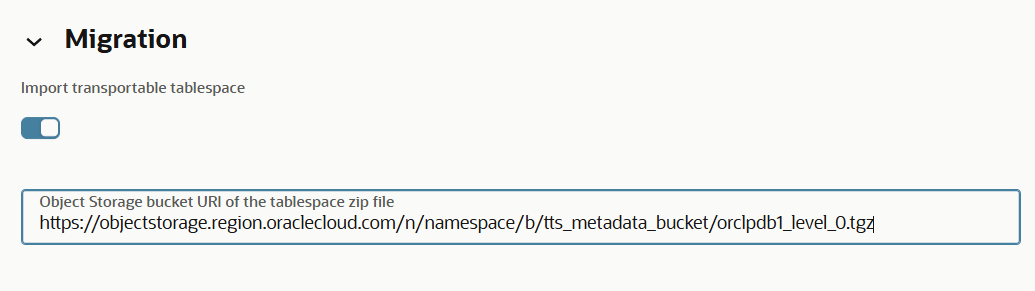
Description of the illustration adbs_transportable_tablespace_provisioning.png
For detailed steps to provision an Autonomous AI Database, see Provision an Autonomous AI Database Instance.
Transport using an incremental tablespace backup of the source database
Before you transporting restoring an Autonomous AI Database, note the following:
-
A level 0 incremental tablespace backup of the source database can only be applied when you are provisioning an Autonomous AI Database; it cannot be applied to an existing Autonomous AI Database.
-
Applying the level 0 backup during provisioning only restores the RMAN backup data from the source database to your target database; no tablespaces, schemas, or database objects are created at this stage.
-
After provisioning, you can apply subsequent level 1 incremental tablespace backups of the source database. Level 1 and subsequent incremental backups can only be applied if the level 0 backup tablespace backup from the source database was applied during provisioning. You must apply these incremental backups in the same order they were created. Each incremental backup updates the RMAN backup on the target database; however, tablespaces and schema objects are not yet created.
-
Complete the transportable tablespace operation by applying the final incremental backup. This final step restores all tablespaces and associated database objects on your target database.
-
Convert the tablespaces to
READ WRITEmode as needed.
Provision the Autonomous AI Database Using the Level 0 Backup
Begin by provisioning your Autonomous AI Database with the level 0 tablespace backup the source database. This operation provisions the database and restores the initial level 0 backup on the database. See Provision an Autonomous AI Database Instance for more information.
Apply Subsequent Incremental (level 1) Backups
After the database is provisioned and the level 0 backup of the source tablespaces is restored, apply any incremental (level 1) backups in sequence.
Steps to update your target Autonomous AI Database with incremental backups:
-
Perform the following prerequisite steps as necessary:
-
Open the Oracle Cloud Infrastructure Console by clicking the
 next to Cloud.
 -
From the Oracle Cloud Infrastructure left navigation menu click Oracle AI Database and then click Autonomous AI Database.
-
On the Autonomous AI Database page, select your Autonomous AI Database from the links under the Display name column.
To apply subsequent incremental tablespace backup from the source database on the target Autonomous AI Database, follow these steps:
-
On the More actions drop-down list, select Migrate Data.
This shows the Migrate Data page.
Note: The Migrate data option is available only for databases that have completed a level 0 import during provisioning and require additional incremental tablespace backup imports to complete the transportable tablespace operation after provisioning.
-
On the Migrate Data page, enable the Import transportable tablespace toggle. When you enable the toggle, an Object Storage Bucket URI of the tablespace zip file field appears. Input the Transportable Tablespace metdata bundle URL in this field.
For example, to apply the level 1 tablespace backup from the source database, specify the appropriate URL for the level 1 tablespace backup from the source database:
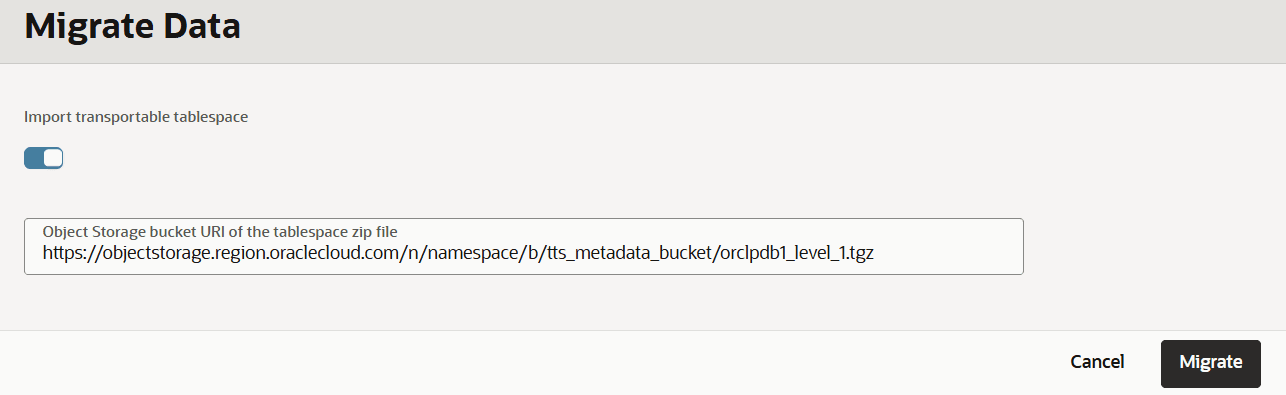
Description of the illustration adbs_transportable_tablespace_incremental.png
...
Similarly, when applying the final tablespace backup from the source database, supply the appropriate URL. For example:

Description of the illustration adbs_transportable_tablespace_incremental_final.png
- Click Migrate.
The database Lifecycle state changes to Updating. After the restore is complete Lifecycle state changes to Available.
-
-
Limitations on Transportable Tablespaces
Lists the limitations on transportable tablespace.
Note the following notes and limitations for transportable tablespaces:
-
Transportable tablespace is supported only when the source database is Oracle AI Database 11g or higher.
-
Transporting tablespaces to Autonomous AI Database is supported only when provisioning a new Autonomous AI Database instance.
-
When you transport a tablespace containing tables with
TIMESTAMP WITH LOCAL TIME ZONE(TSLTZ) data between databases with different time zones, the tables with the TSLTZ data are not transported. However, tables in the tablespace that do not contain TSLTZ data are transported.You can determine the time zone of a database with the following query:
SELECT DBTIMEZONE FROM DUAL;You can alter the time zone for a database with an
ALTER DATABASESQL statement. -
The Daylight Saving Time (DST) version of the source database must be the same as or lower than the DST version of Autonomous AI Database.
-
Objects with underlying objects (such as materialized views) or contained objects (such as partitioned tables) are not transportable unless all of the underlying or contained objects are in the tablespace set.
-
You cannot transport tablespaces that contain XMLType because Oracle XML DB is not supported in Autonomous AI Database.
The following query returns a list of tablespaces that contain XMLTypes:
SELECT distinct p.tablespace_name FROM dba_tablespaces p, dba_xml_tables x, dba_users u, all_all_tables t WHERE t.table_name=x.table_name AND t.tablespace_name=p.tablespace_name AND x.owner=u.username; -
You cannot transport the
SYSTEMorSYSAUXtablespace or objects owned by the userSYS. -
The source and the destination databases must use compatible database character sets. That is, one of the following must be true:
-
The database character sets of the source and the target databases are the same.
-
The source database character set is a strict (binary) subset of the target database character set.
-
The source and the target databases must use compatible national character sets.
-
-
Types whose interpretation is application-specific and opaque to the database (such as
RAW,BFILE, and the AnyTypes) can be transported, but they are not converted as part of the cross-platform transport operation. Their actual structure is known only to the application, so the application must address any endianness issues after these types are moved to the new platform. Types and objects that use these opaque types, either directly or indirectly, are also subject to this limitation. -
The SCN of the source database must be less than or equal to the SCN of the target Autonomous AI Database to which the tablespace is being transported.
-
An Autonomous AI Database instance supports a maximum of twenty-four (24) tablespaces, including both user and system tablespaces. After accounting for the default system tablespaces, such as
SYSTEM,SYSAUX,UNDO,TEMP, andREDO; a maximum of nineteen (19) user tablespaces can be transported to an Autonomous AI Database instance. -
The cumulative size of transported tablespaces must not exceed the maximum database size supported for Autonomous AI Database.